9.5 Removing Markers
There are two main methods of removing unwanted markers.
Kind: concept (user-guide-section) Chapter: 9 Tempo Based Production, Loops, Markers and Regions Source: REAPER User Guide v7.70
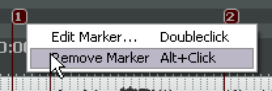
There are two main methods of removing unwanted markers.
To remove a single marker
Position the mouse over the marker “flag” and hold down the Alt key while you click the left button. Alternatively, right-click over the marker flag and choose Remove Marker from the context menu.
To remove a series of markers
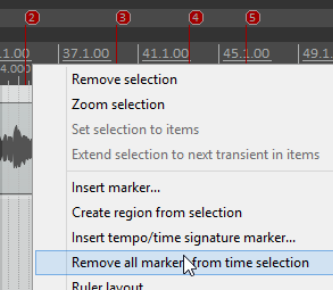
Define a time selection that includes all of the markers that you wish to remove. Right click over the space just above the marker “flags” within the time selection, and choose Remove all markers from time selection from the context menu.