7.17 Creating and Copying Items in Pencil Mode
REAPER’s pencil mode that can be used to create new media items or make copies of existing ones.
Kind: concept (user-guide-section) Chapter: 7 Managing and Editing Media Items Source: REAPER User Guide v7.70
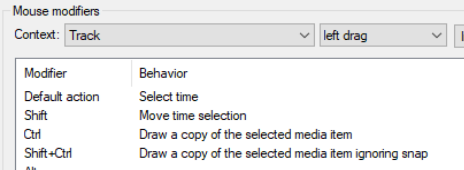
REAPER’s pencil mode that can be used to create new media items or make copies of existing ones. How the feature works is determined by your Track left drag settings on the Mouse Modifiers page of your Preferences window. In Chapter 15 you will learn how to change these settings to suit your own needs. For example, you could assign the Shift modifier to be used to draw a new item. For now, we will be looking at the default settings. These default settings are shown here. By default, the following modifiers can be used when clicking and dragging in an empty area in Arrange view: Ctrl – draws a copy of currently selected media item. Snapping will be applied if enabled. Ctrl Shift - draws a copy of currently selected media item, will not snap. Ctrl Alt - draws a copy of currently selected media item pooling MIDI source data with snapping (if enabled). Shift Ctrl Alt - draws a copy of currently selected media item pooling MIDI source data, will not snap.

The illustration above is an example of this. The first of two existing media items on a track has been selected. By holding Ctrl while clicking and dragging further along that track, a copy of that media item is made.