19.6 Using an LFO Shape with Parameter Modulation
Now let's have some fun and use a low frequency oscillator to further modify the way parameter modulation is applied.
Kind: concept (user-guide-section) Chapter: 19 Parameter Modulation Source: REAPER User Guide v7.70
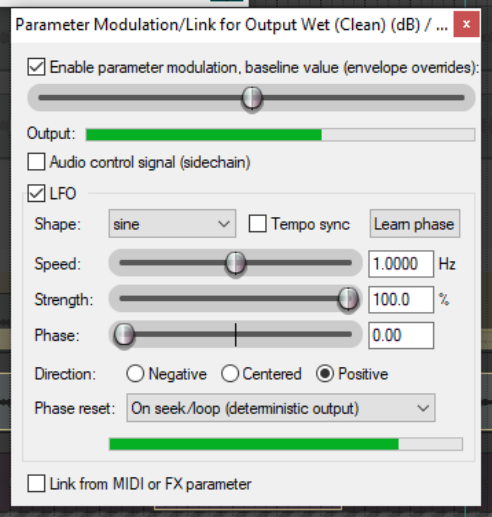
Now let's have some fun and use a low frequency oscillator to further modify the way parameter modulation is applied. Try disabling the audio control and turning on the LFO option. Start with some fairly conservative settings as shown below. Selecting the Tempo Sync option should help make for a fairly safe outcome! The Speed setting controls the signal repeat rate. Strength determines how much of the LFO signal is applied. You can also adjust the default Phase setting. As in the previous examples, direction can be negative, centered or positive. Notice also the Learn phase button: this can be used to assign control to a MIDI or OSC device. Compare how the track now sounds with PM enabled and disabled. If you are familiar with working with low frequency oscillators, you might wish to be a little more adventurous. Otherwise, just save the file as All Through The Night MOD1 LFO.