6.17 Freezing and Unfreezing Tracks
The Freeze tracks actions (from the track panel right click menu Render/freeze tracks command) freeze any track in place, replacing its contents with a single rendered audio item.
Kind: concept (user-guide-section) Chapter: 6 Managing Track and Item FX Source: REAPER User Guide v7.70
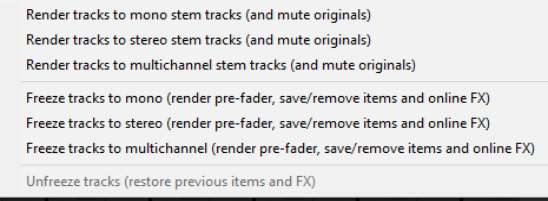
The Freeze tracks actions (from the track panel right click menu Render/freeze tracks command) freeze any track in place, replacing its contents with a single rendered audio item. The first of these actions shown (right) will produce a mono audio item for each track frozen, the second stereo and the third multichannel (according to the number of track channels). If multiple tracks are selected, each will be rendered separately. On line FX are applied to the rendered item, as is the content of any signals sent to the rendered channels from other tracks. Where these include MIDI data or items, they will be rendered as audio. Both on line FX and receives are then removed from the track. Note that a MIDI item with no synth attached to it will be rendered as silence. Where a synth is present, it is the output of the synth that will be rendered. When a track has already been frozen, Unfreeze tracks will appear on the above menu as an action that can be used to restore the track to its state at the point in time that it was frozen. Both the FX chain and any receives will be restored. Other points to note are:
- A track can have further FX and receives added to it after it has been frozen. In this case, if you then
freeze the track again, these FX (along with audio and or MIDI material from the new receives) will be rendered together with the existing frozen material to another new audio item.
- Each unfreeze action will remove the previous freeze on that track and restore it to its state at the time of
that freeze action. Thus, if a track has been frozen, had more effects added and been frozen again, then you will need to unfreeze it twice if you wish to restore it its state immediately before first being frozen.