3.34 Using Microsoft GS Wavetable SW Synth
You can use the Microsoft GS Wavetable Synth if it is included with your Windows version.
Kind: concept (user-guide-section) Chapter: 3 Recording Audio and MIDI Source: REAPER User Guide v7.70
You can use the Microsoft GS Wavetable Synth if it is included with your Windows version. It can be used to play MIDI files that you import into REAPER. You will be shown how to import files in Chapter 4.
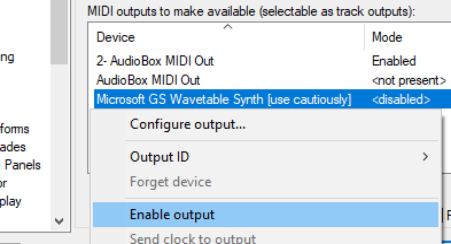
To enable the Microsoft GS Wavetable SW Synth:
- Go to Options, Preferences and display the
Audio, MIDI Devices screen. 2. Under MIDI Outputs, right click on Microsoft GS
Wavetable SW Synth and select Enable output. 3. Click on Apply, then on OK.
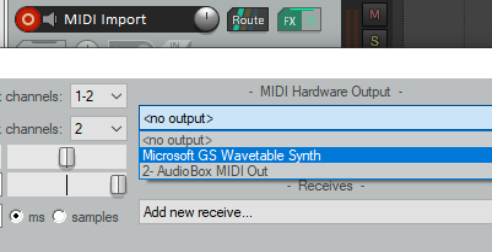
This Synth will now be available as a MIDI Hardware Output.
You can if you wish now use the Microsoft GS Wavetable SW Synth as your output device instead of using a software synth (see above right). However, be aware that this output device is known to create issues with latency.