18.5 Writing Automation
To create automation envelopes using the Write feature.
Kind: concept (user-guide-section) Chapter: 18 Automation – Envelopes and More Source: REAPER User Guide v7.70
To create automation envelopes using the Write feature:
-
In the TCP, click on the Envelope Trim button to open the track's envelopes window.
-
This button (below) shows the current automation mode for that track.: here it is Trim.
-
Select the item (a track envelope or FX parameter) that you wish to automate, and make sure to also select the options Visible and Arm.
-
Set Automation mode to Write.
-
Close the Envelopes window. The envelope button will now show WRT.
-
Position the cursor where you wish to start.
-
Play the song. As you do so, adjust the on screen control (in the envelope lane or FX window) which controls the item you are automating. Stop play when finished.
-
Right click over the Envelope button for that track and from the last section of the context menu select Trim/Read or Read.
-
Play the song. The automation will be applied. In Read mode, the parameter control will move to reflect your changes.
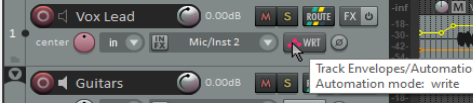
Many of the envelopes window’s functions are also available on the Trim button’s right click context menu.
Tip: The option Automatically add envelopes when tweaking in automation write modes (Preferences, Automation), allows you to create or modify envelopes by adjusting any control during playback.