18.9 Latch Preview Mode
This mode lets you try out changes to parameter values (e.g. volume level or pan position) without writing them to envelopes.
Kind: concept (user-guide-section) Chapter: 18 Automation – Envelopes and More Source: REAPER User Guide v7.70
This mode lets you try out changes to parameter values (e.g. volume level or pan position) without writing them to envelopes. When your parameter settings are right you can then use an action to write them to your envelope(s). Let's start by working thru a relatively simple example, before introducing some of the other options that are available.
Example
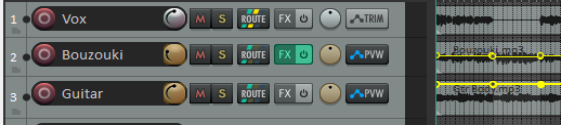
- We want to increase the volume of the featured instrument during the break. We have added a time selection and a volume envelope to the track and inserted points at the start and end of the break. Automation for the bouzouki is set to latch preview mode. If the automation button is not visible this can be set from the right click context menu.

- We play the song, adjusting the volume control until we are happy with the level (in this case at +2.17dB).
Notice, however, that the envelope has not yet been changed. 3. We now display the actions list (Actions, Show action list) and run Automation: Write current values for actively-writing envelopes to time selection. The envelope is now adjusted (see below). Finally we can reset the track automation to trim/read mode.

You can use latch preview mode on more than one envelope on a track, and/or on more than one track. There are “write to” options other than to time selection. Here are some available actions. They can be assigned to keyboard shortcuts, toolbars, and/or menus (Chapter 15).
Set/Write/Clear Automation Mode Actions (see Actions List for full list) Set automation mode actions:
Automation: Set track automation mode to … [latch or latch preview or read or touch or trim/read or write] Automation: Set all tracks automation mode to … [latch or latch preview or read or touch or trim/read or write] Global automation override: All automation in… [latch or latch preview or read or touch or trim/read or write]
Automation write actions:
Automation: write current values for actively-writing envelopes to [entire project or time selection] Automation: write current values for actively-writing envelopes from cursor to [entire project or first touch position or start of project] Automation: write current values for all writing envelopes [from cursor to end project or from cursor to start of project or to time selection] Options: Preserve trailing values when recording automation.
Latch clear actions:
Automation: Clear [track or all track] envelope latches These options together should provide you with all you need for your latch automation preview requirements.