15.14 Exporting and Importing Key Maps
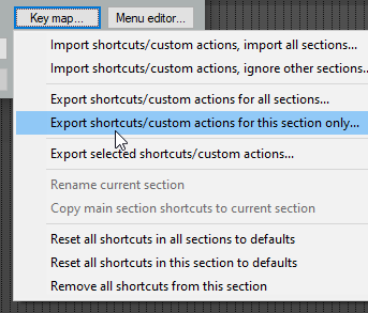
The Key map button near the bottom right corner of the Actions window can be used backup or restore any or all of your keyboard assignments.
Kind: concept (user-guide-section) Chapter: 15 Customization: Actions, Mouse Modifiers, Menus and More Source: REAPER User Guide v7.70
The Key map button near the bottom right corner of the Actions window can be used backup or restore any or all of your keyboard assignments. Exported keymap sets are by default saved as .ReaperKeyMap files in the \KeyMaps directory of your \ Application Data\REAPER folder. Import shortcuts/custom actions… Imports keyboard assignments from an existing .ReaperKeyMap file, either all sections or current section only. Export shortcut keymap file … Exports all current keyboard shortcut assignments to a .ReaperKeyMap file, either all sections or current section only. Export selected shortcut key mappings … Exports only items currently selected to a .ReaperKeyMap file. Reset all shortcut binding to factory defaults Removes your custom keyboard assignments and restores all REAPER defaults, either for all sections or current section only. Remove all shortcuts from this section: the nuclear option! .ReaperKeyMap files can also be included when exporting/importing configuration settings (see Chapter 22).