22.8 Editing Behavior Preferences
The Editing Behavior Preferences include various areas where you can specify default settings that will affect how you work when editing REAPER projects.
Kind: concept (user-guide-section) Chapter: 22 REAPER's Preferences and Other Settings Source: REAPER User Guide v7.70
The Editing Behavior Preferences include various areas where you can specify default settings that will affect how you work when editing REAPER projects.
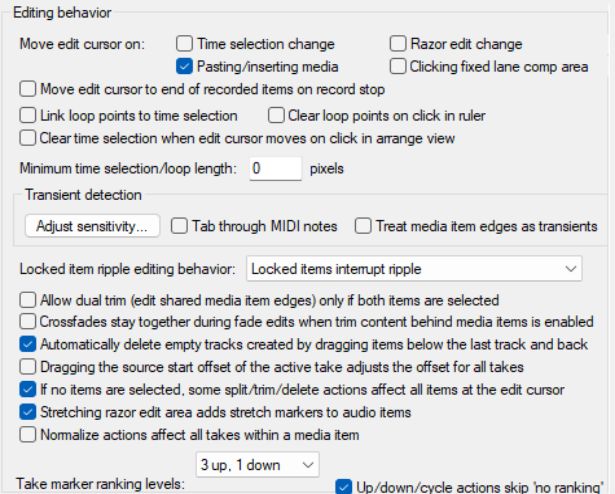
- Specify your edit cursor
behavior, in particular which of the following actions should cause the edit cursor to be moved: Changing time selection, Pasting/inserting media, and/or Stopping recording.
- Specify whether or not to Move
edit cursor on razor edit
change.
- By default link (or unlink) time
selection and loop points.
- Enable or disable the ability for
loop points to be cleared by
clicking on the ruler, and/or
time selection to be cleared
by clicking in arrange view. For example, if you want to click on the ruler as a means of repositioning the edit cursor then you probably won't want loop points automatically cleared.
- Specify a Minimum time selection/loop lemgh.
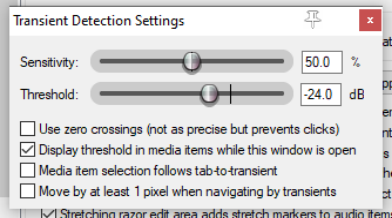
- Adjust tab sensitivity of transient detection, both percentage sensitivity and dB threshold. Click on
Adjust sensitivity to access the options in the Transient detection settings dialog (below right).
- You can also specify whether to Tab thru MIDI notes and/or Treat media item edges as transients.
- How REAPER is to behave with locked items included in a
ripple editing selection. Options are Locked items interrupt ripple (ripple edit interrupted at first locked item but can be completed by repeating the action as often as required to choose which items are ripple edited), Locked items interrupt ripple per-track (similar but on a per track rather than per item basis), Locked items unaffected by ripple (these are edited normally but other items are ripple edited), or Locked items are affected by ripple (lock ignored) (all items in selection are ripple edited, inc locked items).
- Whether to allow dual trim options shared media item edges only if both items are selected.
- Whether crossfades should stay together during fade edits.
- Whether to automatically delete empty tracks created when dragging items below last track.
- Whether dragging the source start offset of the active take should adjust the offset of all takes.
- Whether to split/trim/delete all items at edit cursor if splitting/trimming/deleting with no items
selected. Disabling this will prevent, for example, all items being split if you press S with no item selected.
- Whether to add stretch markers to audio items when stretching razor edit area.
- Whether Normalize actions affect all takes within a media item.
- Specify number of take marker up/down-rank levels.