18.2 The Track Envelopes Window
Any track’s envelopes can be managed from its Envelopes Window .
Kind: concept (user-guide-section) Chapter: 18 Automation – Envelopes and More Source: REAPER User Guide v7.70
Any track’s envelopes can be managed from its Envelopes Window . This includes FX parameter and track send envelopes, The window is opened by clicking on the track’s Envelope (Trim) button in either the TCP or MCP. Basic functions of this window include:
- Set the track’s Automation mode.
- Create envelopes (e.g. for Volume or
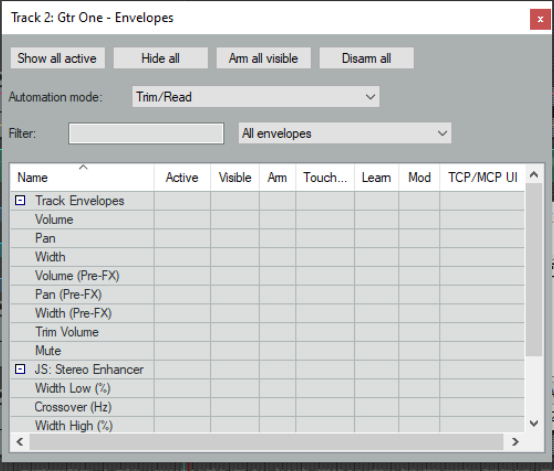
Pan, or for a send or an FX parameter).
- Show or hide any envelopes.
- Arm or disarm automation envelopes. The envelopes window includes options such as showing or hiding all envelopes on the track, arming or disarming all envelopes, and automatically creating envelopes for the last touched parameter, including FX parameters. These options will be explored in the pages that follow. The Filter box can help you find a parameter more easily. For example, type pre in this box and only items whose name includes pre will be displayed, i.e. Pre FX envelopes. All plug-ins in the track’s FX chain will also be listed. Shown here is a JS Stereo Enhancer. Where FX are present on the track, the filter box above the table allows you instead of showing All envelopes to show only Active envelopes or only Last touched FX parameters. This helps avoid screen clutter.