7.24 Take Media Source
The Take media source section of the Media Item Properties dialog box (F2) can be used to view the properties of the currently selected take, or to change or rename its source file.
Kind: concept (user-guide-section) Chapter: 7 Managing and Editing Media Items Source: REAPER User Guide v7.70
The Take media source section of the Media Item Properties dialog box (F2) can be used to view the properties of the currently selected take, or to change or rename its source file. To change the media item contents click on Choose New File, or to rename it use the Rename File option.
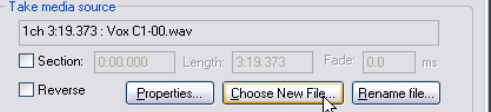
Click on the Properties button for information about the source audio file or MIDI item. In the case of MIDI items, you can also modify some properties, such as Transpose “n” semitones, Only play specified channels, Ignore project tempo, and Chase CC/pitch/program before start offset.