22.15 Custom UI Tweaks (Mac)
The main different Mac options are.
Kind: concept (user-guide-section) Chapter: 22 REAPER's Preferences and Other Settings Source: REAPER User Guide v7.70
The main different Mac options are:
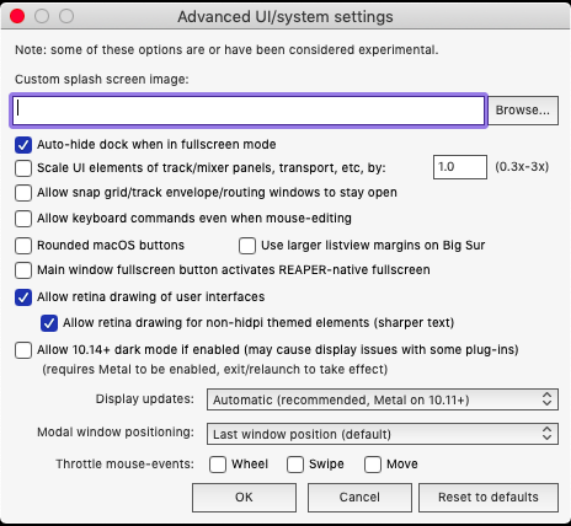
Auto-hide dock when in fullscreen
mode – toggle on/off. Toggle on/off the use of Rounded mac/OS buttons and/or Use of larger listview margins on Big Sur. Setting Main window fullscreen button to activate REAPER-native fullscreen.
Allow retina drawing of user interface
and For non hidpi themed elements: this displays sharper text. Allow 10.14+ dark mode. May cause display issues with some plug-ins. Modal window positioning: options are
Last window position (default) Center on current screen Center on mouse cursor OS positioning Display updates: options are -
Automatic (recommended, Metal on 10.11+)
Disable all optimized drawing
(reduces GPU use) Force classic (10.5-10.9) drawing mode Whether to enable (individually) the throttle mouse events Wheel, Swipe, and/or Move.