13.44 The Scale Finder
You also have the option to use the notes that are currently selected in the MIDI Editor.
Kind: concept (user-guide-section) Chapter: 13 Working with MIDI Items Source: REAPER User Guide v7.70
-
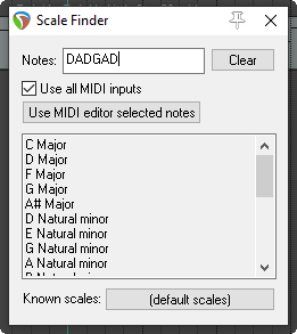
REAPER's main Arrange View includes a feature that MIDI users may find useful – the Scale Finder. It can be used to identify those scales which contain any given set of notes.
-
The Scale Finder is opened using the command View then Scale finder. Notes can be typed directly or entered using a MIDI device (including the Virtual MIDI Keyboard).
-
The file sample reascale (provided and installed with REAPER) can be used with the scale finder, or you can click on the button at the bottom of this window and use the Load command to import a file of your own choosing.
You also have the option to use the notes that are currently selected in the MIDI Editor.