3.10 Multi-Channel Recording
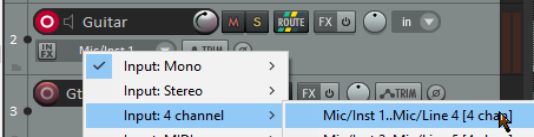
If in its routing window you define a track as multichannel (for example, perhaps 4, 6 or 8 channels) then your recording input context menu for that track will include an option for multichannel recording.
Kind: concept (user-guide-section) Chapter: 3 Recording Audio and MIDI Source: REAPER User Guide v7.70
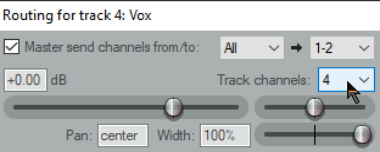
If in its routing window you define a track as multichannel (for example, perhaps 4, 6 or 8 channels) then your recording input context menu for that track will include an option for multichannel recording. You can, for example, record from four, six or eight microphones simultaneously, each to a separate channel on the one track. Up to a maximum of 128. This method is suited, for example, for use with four channel ambisonic microphone arrays as used in surround sound production. For multichannel tracks, there is also a toggle command on the record arm context menu Meters, Multichannel peaks. This should be automatically enabled.