2.16 Analyzing FX Performance
FX plug-ins can impose a heavy load on your computer’s CPU.
Kind: concept (user-guide-section) Chapter: 2 REAPER Project Basics Source: REAPER User Guide v7.70
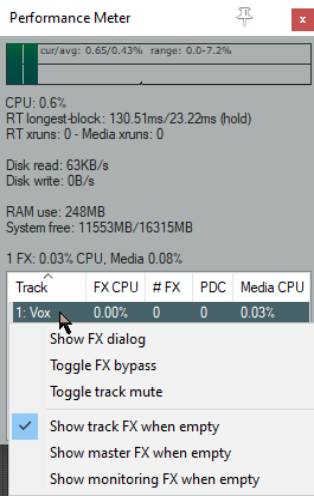
FX plug-ins can impose a heavy load on your computer’s CPU. To help you overcome this, you can use the Performance Meter to closely monitor your FX in the following ways:
- You can check how much CPU is being used by the FX in your various tracks and in the master.
- You can disable and enable FX chains for individual tracks, quickly, easily and conveniently, all together in one place.
- You can toggle on and off the mute status for your tracks, again all in one convenient place. To display the Performance Meter, press Ctrl Alt P, or use the View, Performance Meter command.