23.8 REAPER as Client to MIDI Sequencer Software
REAPER can also be the client of a software MIDI sequencer (such as Temper).
Kind: concept (user-guide-section) Chapter: 23 Using REAPER with Other Applications and Devices (Overview) Source: REAPER User Guide v7.70
REAPER can also be the client of a software MIDI sequencer (such as Temper). You will need virtual MIDI cable software, such as the highly popular MIDI Yoke. Here is an overview:
- Use MIDI Yoke to install a virtual MIDI cable to send
MIDI out from your other program and in to REAPER.
- Start REAPER. Go to Preferences, Audio, MIDI
Devices. Right click over the MIDI device labelled In from MIDI Yoke: 1 (or similar) and choose Enable input for control messages. OK preferences.
- Right-click REAPER's Play button, enable the
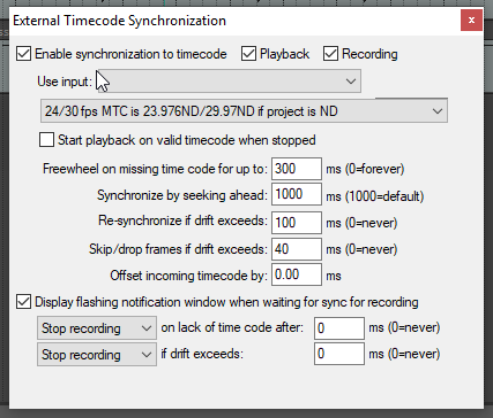
Enable synchronization to timecode box
option (see right) and enable playback, recording, or both. Select the required MIDI input port (in this example MTC: In from MIDI Yoke 1**).** When you close this dialog box, the play button will display a small padlock and the tooltip client to timecode.. Engaging this play button will now mean it is ready and waiting for. sync input.
- In the external program, add a MIDI track and
direct its output to the same MIDI Yoke cable as you used for input in REAPER. You may also
need to enable Send MTC (Midi Time Code) in this program. How you do this in any specific program will of course depend on its own features, interface and capabilities. You will now be ready to go.
For assistance with how to do this with any specific software, consult or ask on one of the REAPER forums.