10.6 Pitch Correction with ReaTune
The plug-in ReaTune can be used for pitch correction, in manual or automatic mode.
Kind: concept (user-guide-section) Chapter: 10 Pitch and Time Manipulation Source: REAPER User Guide v7.70
The plug-in ReaTune can be used for pitch correction, in manual or automatic mode. To use automatic mode (top right), first insert ReaTune into a track’s FX chain, then:
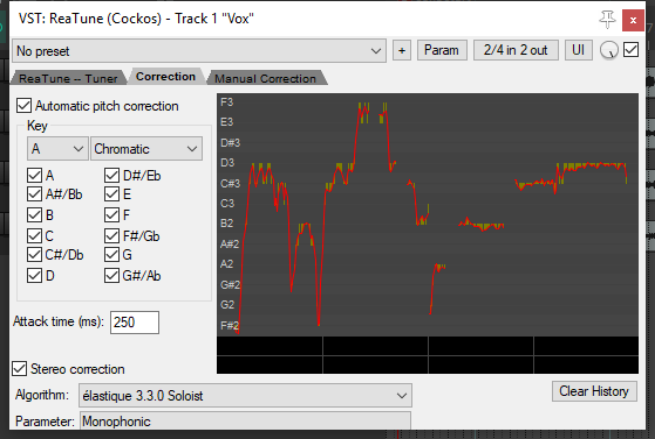
- Select the page headed Correction.
- Enable the Automatic pitch correction option.
- Select the required algorithm and parameter.
- Specify the key and play. To use manual mode (below right) first insert the ReaTune plug-in into a track’s FX window, then:
Select the page headed
Manual Correction. Enable the Manual pitch
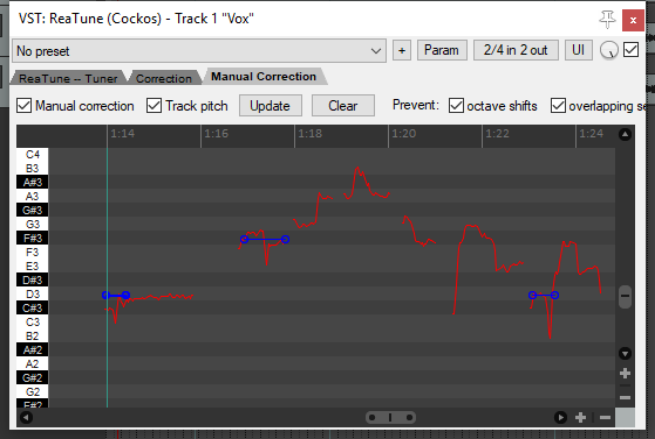
correction option, and other options as preferred.
- Enable or disable the other
options as required. These are Update, Prevent octave shifts, and Prevent overlapping segments. Use your mouse (click and
drag) to draw your corrections. To delete a correction, select the line and press Delete. The Clear button will clear the entire display.