18.23 Moving and Copying Envelopes with Items
You can choose whether or not to move and copy automation envelopes with media items by setting the option to Move envelope points with media items on or off.
Kind: concept (user-guide-section) Chapter: 18 Automation – Envelopes and More Source: REAPER User Guide v7.70
You can choose whether or not to move and copy automation envelopes with media items by setting the option to Move envelope points with media items on or off. This is accessed by right clicking on the Envelope tool on the main REAPER toolbar, or by choosing Envelope points from REAPER's Options menu. In the Actions editor you can assign a shortcut key to toggle this action on and off.
-
If this option is turned off, then envelopes will not be moved or copied with the media items.
-
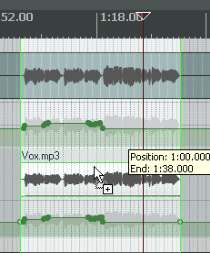
If this option is turned on, then the envelopes will be moved or copied with the media items. An example of this is shown here. A selected portion of the media item on the top track is being copied to the track below it using the Ctrl drag and drop method. There are options for Add edge points (at start and end of time selection) when moving envelope points with items, ripple editing or inserting time, and/or moving multiple envelope points. In the example shown (right), not only is the envelope copied with the media item, but also the option to show guidelines has been selected. Ripple editing options are also available by right-clicking on the ripple edit tool on the toolbar.