9.3 Time Selection Start/End Markers
REAPER treats the start and end of any current time selection as floating markers.
Kind: concept (user-guide-section) Chapter: 9 Tempo Based Production, Loops, Markers and Regions Source: REAPER User Guide v7.70
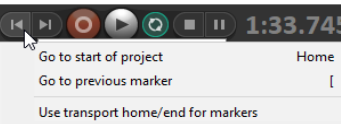
REAPER treats the start and end of any current time selection as floating markers. The shortcut keys for Go to next marker and Go to previous marker are ] and [. These will also find the start or end of the current time selection and move the play cursor there. You can also right-click over the Go to start button and enable the option Use transport home/end for markers. The Go to start and Go to end buttons will now find the previous/next marker or start/end of a time selection when one is current.