9.16 Tempo Based Music Production
REAPER incorporates a number of features which make it a good choice for tempo based music production.
Kind: concept (user-guide-section) Chapter: 9 Tempo Based Production, Loops, Markers and Regions Source: REAPER User Guide v7.70
REAPER incorporates a number of features which make it a good choice for tempo based music production. Some of these elements (such as creating loops and various item properties) have already been mentioned in the context of other uses. Others have not yet been mentioned. In this section we will draw these elements together to give you a flavour of how REAPER can be used for the production of tempo based music. Creating tempo based music is a process that largely consists of creating and sequencing loops from audio samples. These become the building blocks from which a work is created. Individually they can vary in length from a single note to a complete rhythmical pattern, and anything in between.
One advantage that sampling has over MIDI is sound quality. There are any number of human performance techniques and subtle variations that it are very difficult if not impossible to simulate with MIDI. However, until recently MIDI held one big advantage over sampling. A MIDI track can easily be transposed without altering its tempo, and its tempo can be changed without affecting its pitch. This has not always been the case with audio. Take the example of drum loops. One of the biggest problems with using samplers to trigger drum loops has been that when the tempo changes, so does the pitch. Samplers change pitch by slowing things down or speeding things up. This means that as you play keys up and down your keyboard, you must at the same time handle the issue of beat changes. It becomes almost impossible to get the exact tempo you want without having to open the sampler and make adjustments to the loops.
Today, however, there are available many tools that can do all this for you. The time and pitch altering tools that come with REAPER use high quality algorithms which give you all the options you need to change or maintain such factors as length and intonation. It thus becomes possible to modify samples accurately and without distorting their essential characteristics.
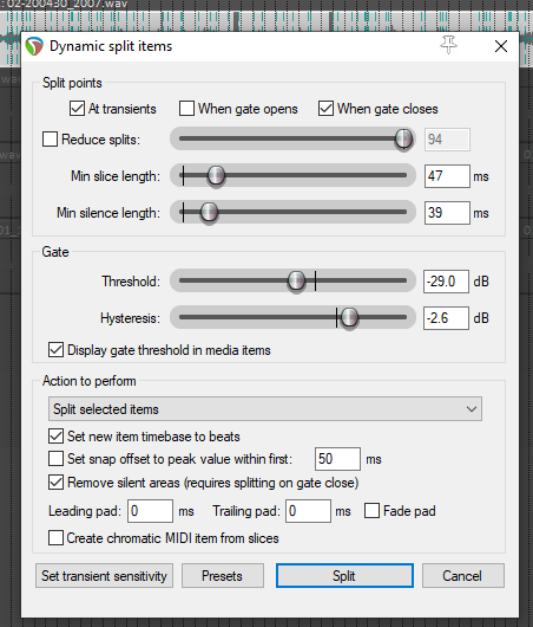
ReCycle is one program that has become popular because its REX grooves automatically arrange themselves to the project tempo on import Bring in a groove and it always fits the song. Take a set of items representing slices in a rhythmic groove, set their timebase to beats, and change the tempo -- magic! They move all over the place but remain exactly in rhythmic time according to the tempo. Using REX files you are able to play back loops at different tempos without altering the pitch. You're on your way to being able to create drum loops and other sounds exactly the way you want them, and with relatively little effort.
Later in this chapter we'll have more to say about ReCycle, and indeed about REAPER's own dynamic splitting capabilities which puts this magic at your disposal. After dynamic splitting, just double click in the BPM area of the transport bar, enter a number and, hey presto! The whole track plays faster, or slower, in perfect pitch. What's more, the whole track will speed up or slow down naturally, without glitches, pauses or stuttering.