3.32 Other MIDI Recording Modes
When recording MIDI, you should select one of six modes.
Kind: concept (user-guide-section) Chapter: 3 Recording Audio and MIDI Source: REAPER User Guide v7.70
When recording MIDI, you should select one of six modes. In the above example, we used Record Input. With this mode, any existing events will be retained: the new material will be recorded as a new take. Four of the other five are Record: MIDI overdub replace modes (in project MIDI items only):
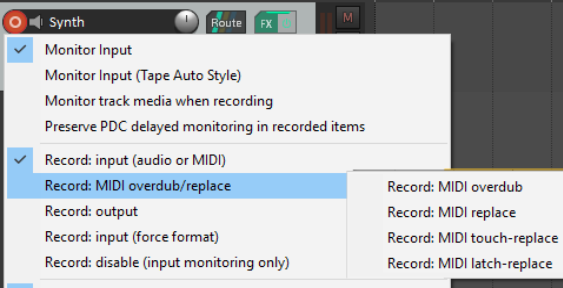
Record MIDI overdub: adds new notes on any channel within existing items, preserving what is already there. Record MIDI replace : from the time you start recording until you stop, existing MIDI notes will be removed and any new material played on any channel will be recorded in their place. Record MIDI touch-replace: existing MIDI notes will be replaced by any new notes played over them on the same channel as the original material. All other existing material will remain as it is. Record MIDI latch-replace: existing MIDI material remains unchanged until you strike the first note. All of the old material will then be replaced with notes played on the same channel as the original material until recording is stopped. Record Output -> Record: output (MIDI): Similar to the input mode, but records the MIDI signal coming
out of the FX chain.
Note that these options can often be used effectively with time selection recording (see sections 3.16 to 3.18) and looped time selection recording (see below).