6.16 Opening a File in Recovery Mode
Any computer program will crash given the right (or wrong?) circumstances.
Kind: concept (user-guide-section) Chapter: 6 Managing Track and Item FX Source: REAPER User Guide v7.70
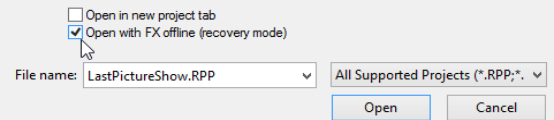
Any computer program will crash given the right (or wrong?) circumstances. This can be because of a problem with some third party plug-in. If this happens, you should enable the option to
Open with FX offline (recovery mode)
when re-opening the file from the File, Open project dialog box (see right). This will open the file with all FX set offline. By reintroducing them online one at a time, you should be able to identify which one is causing the problem. To then fix the problem you should remove this plug-in and replace it with another of equivalent functionality. Another method is to hold down Alt while you open a file from the File, Recent projects menu.