13.9 MIDI Editor CC Lanes
As discussed earlier, clicking on the small + (plus sign) to the right of the of the CC lane name will add a new lane.
Kind: concept (user-guide-section) Chapter: 13 Working with MIDI Items Source: REAPER User Guide v7.70
As discussed earlier, clicking on the small + (plus sign) to the right of the of the CC lane name will add a new lane. Clicking on the down arrow will display a list CC lane types (Bank Select, Mod Wheel, etc) from which you can make your choice.
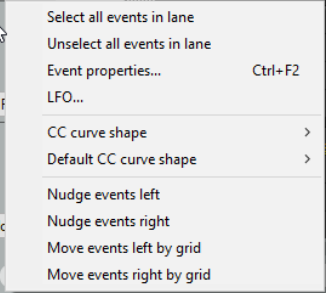
Section 13.10 will show you the “nitty gritty” of working in these lanes – adding events, deleting events, etc. First, though, let’s take a closer look at the CC lane environment. Right click over the CC lane panel area to display a menu of options.
Select all events in lane Unselect all events in lane
These are self-explanatory
Event properties ...
Displays the event properties dialog for selected item.
CC curve shape
Allows you to change the CC curve (envelope) shape for selected events. Available shapes are square, linear, square, slow start/end, fast start, fast end and bezier. See also Chapter 18. Note that for parameters whose value is either on or off (such as Off Velocity) the only available shape is square.
Default CC curve shape
Allows you to change the default CC curve shape for new events.
Nudge events left/right Move events left/right by grid
Nudge/move selected events in lane left or right.
LFO...
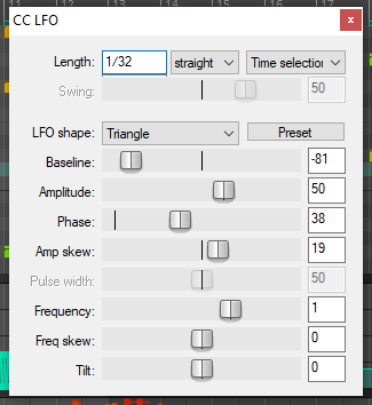
Adds a low frequency oscillator to either the entire lane or within the current time selection. LFO types are straight, triplet, dotted or swing. LFO parameters are as shown here
There are a few interesting items that you can display in your lane or lanes that are worth a special mention, because they might otherwise slip under your radar. These include Notation Events, System Exclusive messages, Text Events, and Bank/Program Select.