3.44 Recording Live Windows Output
Windows users (Vista/7/8/10 and 11) can use WASAPI drivers to record live Windows output (for example, subject to copyright constraints, a YouTube video).
Kind: concept (user-guide-section) Chapter: 3 Recording Audio and MIDI Source: REAPER User Guide v7.70
Windows users (Vista/7/8/10 and 11) can use WASAPI drivers to record live Windows output (for example, subject to copyright constraints, a YouTube video). This requires the use of feedback looping, so you should proceed with caution beyond this point. This is not recommended for beginners.
First, create a new project file. Display the project settings (Alt Enter) and on the Advanced page enable Allow feedback routing. This is also known as “loopback recording.” See Notes below.
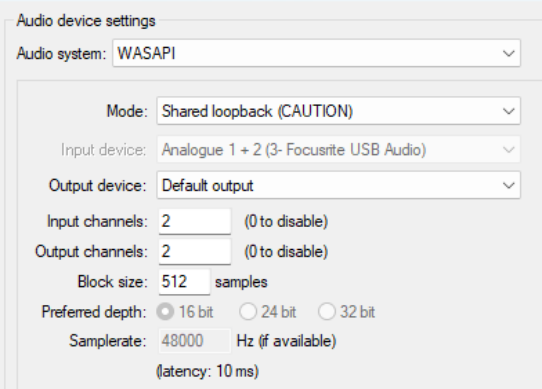
Next, display your Preferences, Audio, Device window and select WASAPI as your audio system. Select Shared loopback mode (see right). Your block size and sample rate will need to match those of your sound device, as set in the Windows Control Panel.
Finally, you simply add a new track and arm it for recording. You will probably want to set input to stereo.
Mute the track’s audio output and press Ctrl R to record whatever you are currently playing in Windows. For example, this might be a YouTube video that you are currently listening to over your speakers.
Note 1: Always proceed with caution when considering the use of feedback routing. Inappropriate use can result in damage to your hearing, your equipment or both. Definitely not recommended for beginners..
Note 2: If your computer has both an internal sound card and an external one (such as Focusrite Audio Box or Presonus Studio) you might need to resolve any possible conflict before doing this. One way could be to access your Window Control Panel’s sound settings and to temporarily disable the internal sound card and/or make the external card the default.