2.15 Managing the Play Cursor
By default, when a project is playing, pressing Stop (or Spacebar) will stop playback and return the play cursor to its previous starting position.
Kind: concept (user-guide-section) Chapter: 2 REAPER Project Basics Source: REAPER User Guide v7.70
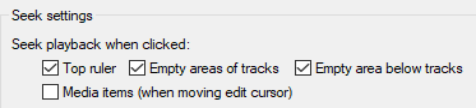
By default, when a project is playing, pressing Stop (or Spacebar) will stop playback and return the play cursor to its previous starting position. Pressing Pause (or Enter) will pause playback at the current play cursor position. You can also specify that the play cursor should be moved when you click on the Time Ruler, an empty area of any track and/or in the empty area below tracks. These three options can be enabled/disabled in your Seek playback when clicked. (Options, Preferences, Audio, Seeking settings).