6.6 Controlling FX from the TCP
Rea plugins with their controls can be displayed in the TCP.
Kind: concept (user-guide-section) Chapter: 6 Managing Track and Item FX Source: REAPER User Guide v7.70
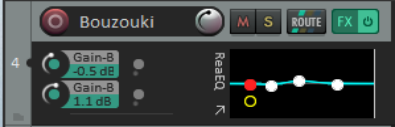
Rea plugins with their controls can be displayed in the TCP. Right-click over the FX name in the FX chain panel and choose Show embedded UI in TCP. The FX will be displayed as shown here, with a number of slots to its left. Right click over any slot, select the FX from the menu, then the control to be displayed. This is illustrated on the right.