15.32 Customizing Track Panel Area Width
There are any number of situations in which you might wish to change the width of the track panel area in arrange view.
Kind: concept (user-guide-section) Chapter: 15 Customization: Actions, Mouse Modifiers, Menus and More Source: REAPER User Guide v7.70
There are any number of situations in which you might wish to change the width of the track panel area in arrange view. For example, you might wish to make more space available for your actual arrangements.
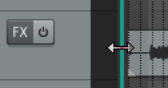
If you hover your mouse over the border between the track panel and the main (arrange) area then a vertical colored line with a double-headed arrow will appear (as shown here). This line defines the boundary between the track panel and the arrange area. This boundary line can be moved to adjust the width of the track panel relative to the main area. Drag left and the panel will become narrower: drag right and it will become wider.
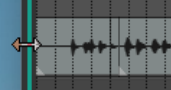
The first time that you double-click on that boundary line the TCP will be removed from view altogether (as shown here). If you then move your mouse to just inside the left edge of your REAPER window and hover there then the boundary line will again be displayed. Double-click on this and the TCP will be restored to its previous position. Thus, doubleclicking on the boundary line will toggle you between the two states. This trick can be handy, for example, if you wish to temporarily give the whole screen to the arrange area to work there, knowing that the TCP can be restored at any time with a simple double-click. To summarize:
Double-clicking on the vertical boundary line between the TCP and arrange area will toggle you between
two states, i.e. the previous state will be restored, so that that now becomes the current state. Dragging that line right or left will increase or decrease the TCP width for the current state.
Finally … when you close REAPER, it will remember your current boundary position and restore that when the program is next reopened.