11.11 Master Hardware Outputs
Output from the master can be directed to one or more of your available hardware outputs.
Kind: concept (user-guide-section) Chapter: 11 The Mixer and The Master Source: REAPER User Guide v7.70
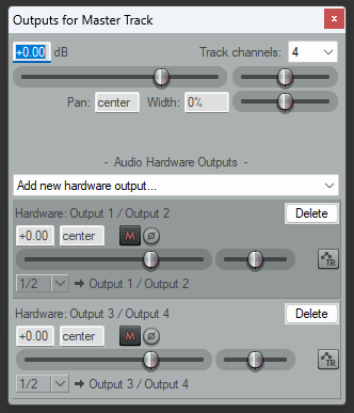
Output from the master can be directed to one or more of your available hardware outputs. This can be done using the routing matrix. The master routing button (in the Mixer) can also be used to set up and manage your hardware output or outputs.
- Right click on the ROUTING button to display a menu of
hardware output options. These can be toggled on and off in any permutation that you require.
- Left Click on the ROUTING button to display the master track
outputs window. This can be used to control the levels and panning of the signals to the hardware outputs. For each output you can independently toggle mute on/off, toggle phase invert, set volume level and set pan position.