13.24 Input Quantization
Input Quantization is a process by which MIDI notes are automatically quantized as they are entered.
Kind: concept (user-guide-section) Chapter: 13 Working with MIDI Items Source: REAPER User Guide v7.70
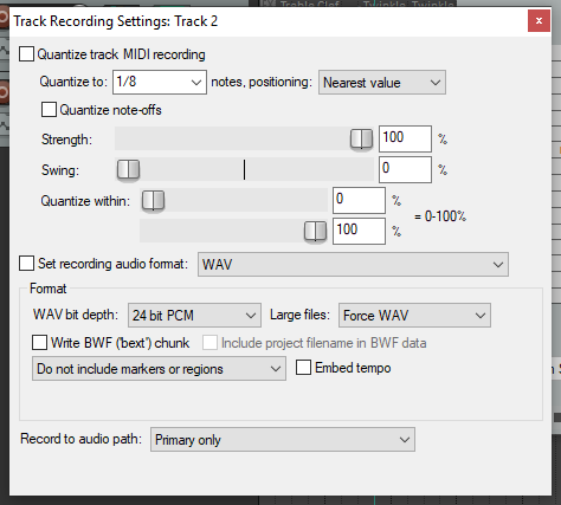
Input Quantization is a process by which MIDI notes are automatically quantized as they are entered. This could be, for example, by playing your MIDI keyboard, or the REAPER Virtual Keyboard. Input quantization is applied on a per track basis. Right click on a track’s red record arm button (TCP or MCP) or on its record options button (TCP) and choose Track Recording Settings from the menu. The dialog box shown on the right will be displayed. Select the option to Quantize track MIDI recording. Options then available include:
- The note length to be used for
quantization (e.g. 1/8).
- Quantize positioning preference.
Options are Nearest value, Previous value and Next value.
- Whether to quantize note-offs.
- Quantization strength. A lower
setting will allow more subtle variation, creating a more “human” effect by allowing minor variations in how strictly the quantization is applied.
- Swing setting. This can be between 0% and 100%. You can use this setting to add a touch of delay to
those notes that do not fall on the upbeat. The best way to understand how these settings affect how your notes sound is to try a few examples.
- Quantize within % range. These are similar to the Nearly Quantized and Far From Quantized faders in the
Quantize Events dialog box (see previous section).
In addition, the Main (alt Recording) section of the Action List includes actions to:
- Toggle MIDI input quantize for all tracks, selected tracks, or last touched track.
- Enable or disable MIDI input quantize for all tracks, selected tracks, or last touched track.