15.16 Importing and Loading Scripts
For more advanced programs which go beyond chaining together actions, you can import into REAPER custom scripts that you may have written or obtained (perhaps from the Reaper Stash at https://stash.reaper.fm/tag/Custom-Actions) and which add extra functionality to the program.
Kind: concept (user-guide-section) Chapter: 15 Customization: Actions, Mouse Modifiers, Menus and More Source: REAPER User Guide v7.70
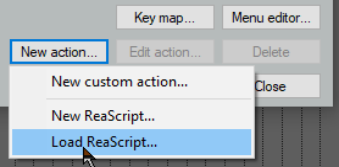
For more advanced programs which go beyond chaining together actions, you can import into REAPER custom scripts that you may have written or obtained (perhaps from the Reaper Stash at https://stash.reaper.fm/tag/Custom-Actions) and which add extra functionality to the program. Python, EEL and Lua scripts can all be imported. For Windows users, to access actions written in Python, Python will need to have been installed on your computer and ReaScript enabled on the Preferences, Plug-ins, ReaScript page. Once you have downloaded and stored your required scripts on your hard drive, you can load them into REAPER by clicking first on the New action button, then Load ReaScript, then navigate to the appropriate directory, then select the required file(s) and click on Open. The topic of writing scripts is outside the scope of this User Guide, although there is a brief introduction to ReaScript in Chapter 23. If you are interested in learning more you should visit the REAPER web site, and in particular: www.cockos.com/reaper/sdk/reascript/reascript.php
ReaScript documentation can also be opened from REAPER's Help menu.