14.11 XML Import
You can import an XML file (for example, as might be produced by Finale Notepad) by dragging and dropping the file from Windows Explorer or Mac Finder into REAPER's arrange view.
Kind: concept (user-guide-section) Chapter: 14 Music Notation and REAPER's Notation Editor Source: REAPER User Guide v7.70
You can import an XML file (for example, as might be produced by Finale Notepad) by dragging and dropping the file from Windows Explorer or Mac Finder into REAPER's arrange view. This applies to both normal .XML files and zip compressed .MXL files. When you do this, you will be presented with a number of options:
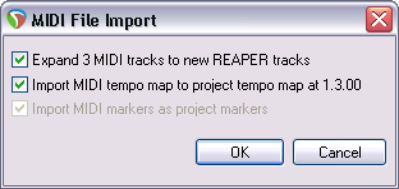
Expand the MIDI tracks into an equivalent number of REAPER tracks. If not selected, all imported MIDI tracks will go on to one REAPER track.
Import the MIDI tempo map to the project tempo
and Import MIDI markers (if any) to project markers. REAPER will import the file as an in-project MIDI item. This can be opened and edited in the MIDI Editor like any other.