13.8 Control Change Basics
MIDI Data Control Change (CC) messages can be recorded during live performance, and edited or manually entered using the CC lane in the MIDI Editor.
Kind: concept (user-guide-section) Chapter: 13 Working with MIDI Items Source: REAPER User Guide v7.70
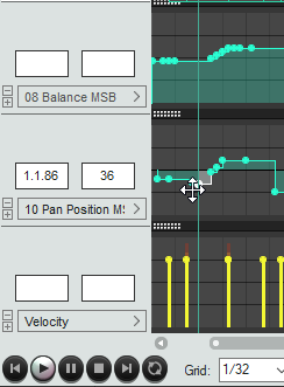
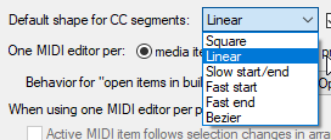
MIDI Data Control Change (CC) messages can be recorded during live performance, and edited or manually entered using the CC lane in the MIDI Editor. The CC Lane appears at the bottom of the MIDI Editor. Data is displayed horizontally according to its position on the Timeline, and vertically according to the value of the data. Where it makes sense to do so, you can cut/copy/paste CC events from one lane to another. Note that the edit cursor will be moved when you click your mouse in a CC lane. Most CC data has a value of 0 at the bottom of the CC Lane, and 127 at the top of the CC Lane. The example (right) shows Velocity. Exceptions to this rule include Pitch, Pan and Pan Position, which are displayed as positive or negative variations from a centre line. The information displayed in the CC Lane is selected from the drop-down list at the left of the window. Most CC events are displayed as linear and curved envelopes, similar to track envelopes (velocity being one exception). The topic of envelopes is covered in depth in Chapter 18. CC Data is entered or edited by double-clicking or clicking and dragging the mouse. To delete an event, select it, then press Delete. The default segment (point) shape is set on the Editing Behavior, MIDI Editor page of your Preferences (see below right). Notice that as you sweep your mouse along the lane, the values at the current mouse position are displayed in the panel to its left. The Mouse Modifiers page of REAPER's Preferences includes the ability to customize left drag and double-click behavior when working with MIDI CC events. Some Notation Editor events can also be displayed in lanes, where they can be edited, moved or deleted, or new such events added – see Editing Notation Events in Other Views.