7.25 Normalizing Items
Normalizing adjusts the volume of an item (or item selection) to a standard level.
Kind: concept (user-guide-section) Chapter: 7 Managing and Editing Media Items Source: REAPER User Guide v7.70
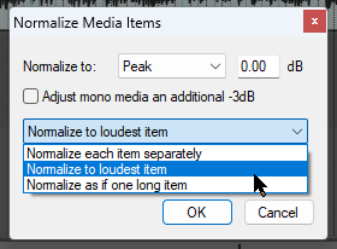
Normalizing adjusts the volume of an item (or item selection) to a standard level. Select the item(s): from the right-click context menu choose Item processing then Normalize items (Peak/RMS/LUFS). You can optimize to LUFS-1, RMS-1, Peak, True Peak, LUFS_M max or LUFS-S max, as per JS Analysis Loudness Meter options. Normalize as if one long item raises the level of all items relative to each other. At 0.00 dB this will be as far as is possible without clipping. If you Normalize each item separately it can be expected to result in a greater increase in volume for some items than for others. With Normalize to loudest item is selected the relative volime of media items to each other will stay the same. There is also an option to Adjust mono media items an additional -3dB. Items can also be normalised by clicking the Normalize button inside the Item Properties dialog. Also, you are able to normalize items or regions when rendering selected media items not through the master via the File, Render dialog.