7.3 Power Editing with Mouse Modifier Overrides
You have already encountered several of REAPER’s mouse modifiers: these are what gives you the ability to use your mouse to perform so many tasks: for example, when razor editing – Alt right drag to make a selection, **Ctrl left….
Kind: concept (user-guide-section) Chapter: 7 Managing and Editing Media Items Source: REAPER User Guide v7.70
You have already encountered several of REAPER’s mouse modifiers: these are what gives you the ability to use your mouse to perform so many tasks: for example, when razor editing – Alt right drag to make a selection, Ctrl left drag to copy a selection, and so on. There’s a section dedicated to mouse modifiers in more detail later in this chapter.
REAPER’s mouse modifiers have to handle so many diverse tasks beyond just razor editing that finding your way around them can be a clumsy process. A solution to this is to be able to create your own alternative set of modifiers all relevant to a particular task (in this case razor editing), so that you can focus on that task alone.
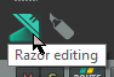
By clicking on the razor edit toolbar icon (shown above) you are able to activate an alternative set of arrange view modifiers dedicated specifically to razor editing, all using the left mouse button. The button lights up and becomes animated. You can define the various modifiers as you wish.