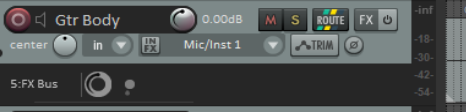
2.22 Showing Sends in the Track Panel
displays your sends in the track panel (as shown here).
Kind: concept (user-guide-section) Chapter: 2 REAPER Project Basics Source: REAPER User Guide v7.70
Options, Show sends in TCP (when size permits)
displays your sends in the track panel (as shown here). You can make adjustments (without opening the routing window. You can click on the send to access all the send controls, or right click for a menu which includes Mute send, Remove send, Show track routing window and Go to destination track.