18.27 Automation with Grouped Track Parameters
If you have created track groupings in which you have defined relationships between various parameters, you can ensure that those relationships are maintained (or not, as you wish) when automation envelopes are being written.
Kind: concept (user-guide-section) Chapter: 18 Automation – Envelopes and More Source: REAPER User Guide v7.70
If you have created track groupings in which you have defined relationships between various parameters, you can ensure that those relationships are maintained (or not, as you wish) when automation envelopes are being written. This is done using the group Automation Mode column on the Track Grouping Matrix.
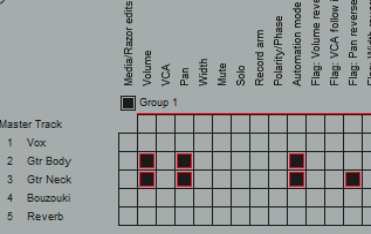
As when the track parameters themselves are grouped, the automation mode status for each track in the group can be set to lead, follow, or both lead and follow. Here are examples. In each case, the grouping is similar to that used in the exercise file All Through The Night GROUPS.RPP. If you completed those examples it might help you to open that file now.