6.7 Managing FX Parameters
Click on the Param button then FX parameter list in any FX window for a range of FX parameter management option, or click on any parameter control in the FX window then on the Param button to open a menu….
Kind: concept (user-guide-section) Chapter: 6 Managing Track and Item FX Source: REAPER User Guide v7.70
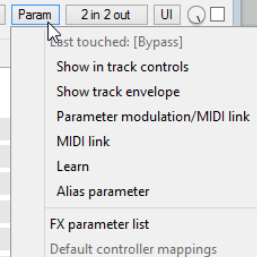
Click on the Param button then FX parameter list in any FX window for a range of FX parameter management option, or click on any parameter control in the FX window then on the Param button to open a menu (right). Show in track controls. This adds a control knob for any parameter to both the Track Control Panel (TCP) and the Mixer Control Panel (MCP). Alternately, choose this command without first touching any control to display a list of parameters for this particular FX. An example (using two parameters from JS Chorus) is shown here (below right). To remove any of these controls, right-click over the control and choose Remove from list from the menu. Show track envelope. Automation envelopes can be added for any FX parameters. These can be displayed in their own lanes. See Chapter 18. Parameter Modulation. This is an advanced topic. Parameter modulation allows you to define a relationship between two parameters so that one is controlled by the other. For example, you might want a threshold's ratio to automatically increase as the threshold is lowered. This topic is explained in Chapter 19. MIDI link. This lets you map track MIDI (not control MIDI) to the parameter. Thus, for example, you could use recorded MIDI CC as automation. This is explained in the chapter dealing with Parameter Modulation. Learn. If using an external MIDI control device you can assign FX parameters to controls (such as knobs or faders) on that external device. This topic is covered in detail in Chapters 12 and 19. Alias parameter. This allows you to change for the single instance the name of a parameter. FX parameter list. This can be used to assign track controls, a track envelope, parameter modulation, MIDI link, Learn or an Alias name directly from the menu to any of the FX’s parameters.
