16.18 Bridging and VST Plug-in Run Mode
If you are using 64-bit REAPER and wish to use older 32 bit plug-ins you can do so by bridging.
Kind: concept (user-guide-section) Chapter: 16 REAPER Plug-ins in Action Source: REAPER User Guide v7.70
If you are using 64-bit REAPER and wish to use older 32 bit plug-ins you can do so by bridging. By default, REAPER will attempt to work out for you whether this bridging is required (Options, Preferences, Plug-ins, Compatibility). To override this setting for any plug-in, choose Run as from its context menu, then select one of three options: Separate process: all bridged plugins for which this is selected will be put into a single process, external to the main Reaper process. This minimises CPU load: however, if one plugin crashes the bridge process, all the other bridged plugins will die too. Dedicated process: this puts each bridged plugin into a separate bridge process of its own. This will prevent a buggy plug-in from crashing the entire bridge, but it has the downside of increasing the overall CPU load. Native only: the plug-ins are run inside the main Reaper process. Bridging can serve another useful function. Even though it is primarily intended for use with 32 bit plug-ins, you can if you wish also bridge (most likely in a dedicated process) any 64-bit plug-in. This has the effect of firewalling REAPER against any adverse effects that could potentially arise from a buggy 64-bit plug-in. A further choice, Embed bridge UI, determines whether the bridged plug-in GUI is displayed in the FX Chain wrapper window (or as a floating window) or is displayed in a completely separate (Windows / OSX) window. The choice is provided as some bridged plug-ins behave better in one context than in the other.
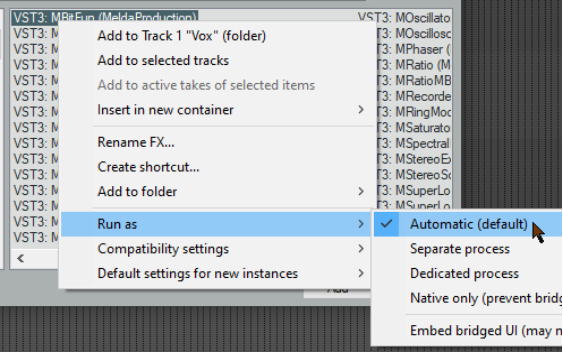
The Plug-ins, Compatibility page of your Preferences option to Terminate REAPER immediately if a plug-in corrupts the process heap will cause REAPER to crash if it encounters a buggy or malicious plug-in.
Remember! You should not store 32 bit plug-ins in the same directory as 64-bit plug-ins.