10.3 Using the ReaPitch Plug-in
Insert ReaPitch into a track’s FX chain and you have a powerful pitch manipulation tool at your disposal.
Kind: concept (user-guide-section) Chapter: 10 Pitch and Time Manipulation Source: REAPER User Guide v7.70
Insert ReaPitch into a track’s FX chain and you have a powerful pitch manipulation tool at your disposal. For example, you can use ReaPitch to create vocal harmonies.
The illustration (right) shows ReaPitch in the FX chain for a vocal track. The Elastique Soloist algorithm has been selected, together with the Monophonic parameter. The pitch has been shifted down by 25 cents and the effect panned 50% right.
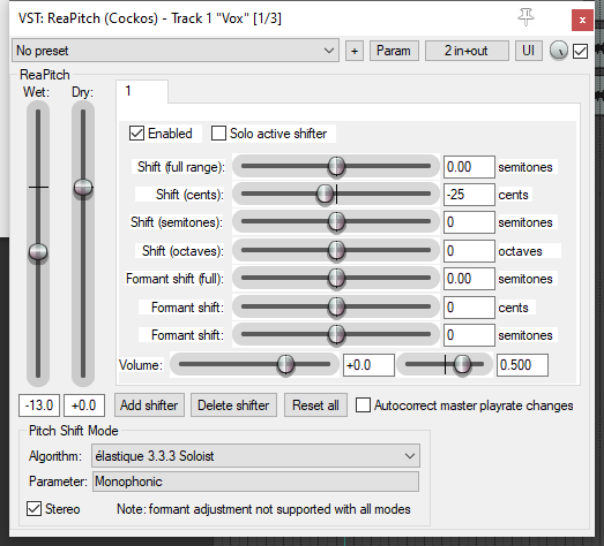
You can use the Add shifter tab to add more shifters, each with its own i independent settings (including pan and volume). Any one of these can be Soloed. This can be helpful when evaluating alternative options.
The Wet and Dry mix faders, however, apply to the overall plug-in.
Note: REAPER also supports the use of third party VST3 products such as Melodyne 4.2+, provided that ARA is enabled in your preferences.
Pitch Shifting/Channel Splitting
REAPER’s channel splitting capabilities are explained in some detail in the section More REAPER Routing Examples (and elsewhere). With channel splitting, you can, for example, not only create several vocal harmonies, but also apply different FX plug-ins or plug-in chains (such as Reverb or Delay) to each of your different harmonies.