22.14 Custom UI Tweaks (PC)
The General page of the Options, Preferences window includes an Advanced UI/System tweaks button which enables you to further customize REAPER’s on-screen appearance.
Kind: concept (user-guide-section) Chapter: 22 REAPER's Preferences and Other Settings Source: REAPER User Guide v7.70
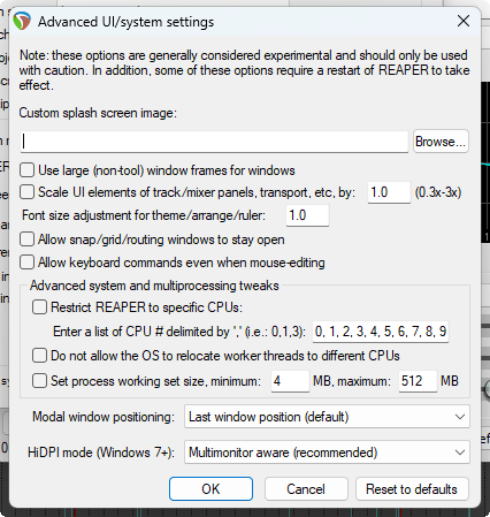
The General page of the Options, Preferences window includes an Advanced UI/System tweaks button which enables you to further customize REAPER’s on-screen appearance. There are some differences between Windows and OS options. Shown right are the options for PC users:
Custom Splash Screen – A .BMP or .PNG file.
Use large window frames for windows.
Scale UI Elements (e.g. buttons on toolbars). Can be useful if using high screen resolution. This can be used to display some screen elements as larger (if set above 1.0) or smaller (if set below 1.0)
Font size adjustment for theme/arrange/ruler
This allows you to increase the font size for these screen elements – e.g. a value of 1.1 will increase font size by 10%/
Allow track envelope/routing windows to stay
open. Stops track routing and envelope windows from automatically closing when they lose focus.
Advanced system and multiprocessing tweaks
to determine how REAPER behaves on a system with two or more processors. Use caution!
How you would like modal windows to be positioned on reopening: Last window position, Center on current screen, Center on mouse cursor or OS positioning.
HiDPI mode (Windows 8.1+): Unaware, Aware, Multi-monitor aware or DPI ignorant.