12.12 Item Selection Sets
By using item selection sets, you are able to create many different selections of items within a project file and select all of the items in any set simply by selecting that set name.
Kind: concept (user-guide-section) Chapter: 12 Managing The Overall Project Source: REAPER User Guide v7.70
By using item selection sets, you are able to create many different selections of items within a project file and select all of the items in any set simply by selecting that set name. The procedure is as follows:
- Use the command View, Screensets/Layouts to display the Screensets window.
- Select the Selection sets tab.
- Within your project, select all of the items to be included in the group. These can be on a single track or across any number of tracks.
- Select a set number, then click on Save.
- Give the group a name and press Enter.
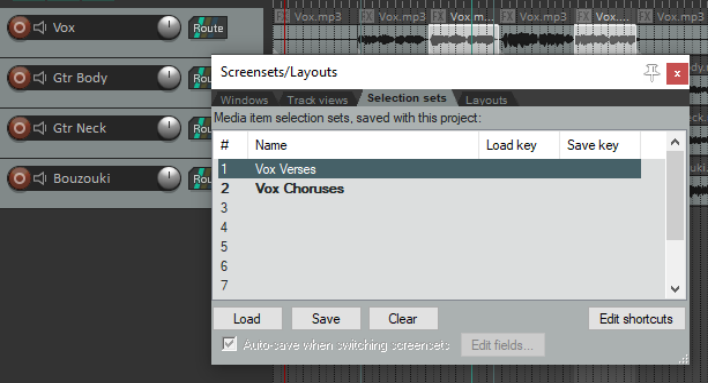
At any time you can now recall that group by doubleclicking on its name, or by selecting the name and clicking on Load.
In the example shown here, two selection sets have been created, one for Vox Verses and one for Vox Choruses. Simply by doubleclicking on the required set name, we can select all of the items in either set.