14.3 Opening MIDI Items in the Notation Editor
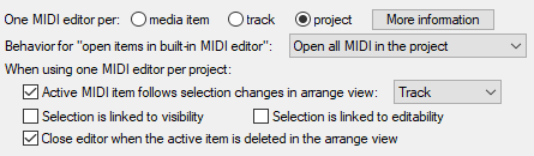
Under Options, Preferences, Editing Behavior, MIDI Editor you can specify your default preference as to whether you want one MIDI editor instance opened for each item, for each track, or for the entire project.
Kind: concept (user-guide-section) Chapter: 14 Music Notation and REAPER's Notation Editor Source: REAPER User Guide v7.70
Under Options, Preferences, Editing Behavior, MIDI Editor you can specify your default preference as to whether you want one MIDI editor instance opened for each item, for each track, or for the entire project. When in musical notation mode, it can often be helpful to have all MIDI items open together.
On the same page, you can also determine what happens by default when you open a MIDI item in the MIDI Editor, either by doubleclicking, or using the Open in built-in editor command. The options are to open the clicked item only, all selected MIDI items, all MIDI items on the same track, or all MIDI items in the project. Your default setting can be overridden for individual projects from the MIDI Editor's Contents menu. There are also a number of other options, shown above.