5.16 VCA Grouping
The origins of VCAs (Voltage Controlled Amplifiers) predate digital audio.
Kind: concept (user-guide-section) Chapter: 5 Project Arrangement Basics Source: REAPER User Guide v7.70
The origins of VCAs (Voltage Controlled Amplifiers) predate digital audio. By way of analogy, VCAs in REAPER are a form of track grouping which allows tracks to be followers within a group to a single track lead. VCA follow tracks will have their volume dBs added to that of the VCA lead track: thus, with VCA grouping the process is additive. With conventional grouping, (such as in section 5.16) nothing is added, the tracks are simply linked. VCA groups can be set up and managed using the same track grouping matrix as in 5.16. In this section we will keep to simple examples, to help you understand the VCA concept. The basic procedure for creating a VCA group is:
- Add a new track at the end of your project and give it a suitable name, such as VCA Control. Ordinarily, this track should contain no media items. 2. Display the track grouping matrix for this track and select a currently unused group. Name this group VCA. 3. Set the VCA status in this group for your VCA Control track to L (for lead). 4. Set the VCA status in this group for any tracks that you want it to control to F (for Follow).
Example
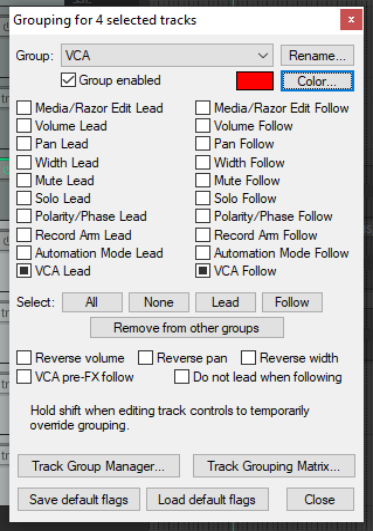
Open the file All Through The Night.RPP and save it as All Through The Night VCA.RPP. Pan the first guitar track 35% left and the other 35% right. Add a new track (Track 5) and name it VCA Control. Display the track grouping matrix (Ctrl Alt G). Make sure that the other tracks are in the same order as shown here, below right. Right-click over the text Group “n” to open the Grouping dialog box (above). Click the Rename button, then type VCA, then on OK, then Close the dialog box.
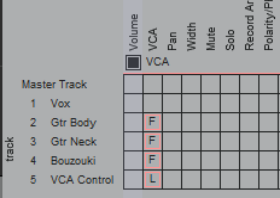
Set up this group as shown (right), so that track 5 is your VCA lead track and tracks 2, 3 and 4 are VCA follow tracks. Play the song. As you raise the volume fader on the VCA control track, the three instrument tracks will each become louder. As you turn down the volume on track 5, the instruments will become quieter. Notice that the VU meter levels on the follow instrument tracks will change. The adjusted volume of these tracks (added to that of any audio produced by any items in VCA control track itself) is sent to the lead. Thus, the lead's VU meter levels change as the VCA control track fader is adjusted. Now let's try something different. Make sure that the pan law for all tracks is set to Stereo balance/mono pan. This is done by right clicking over the track's pan control and selecting from the pan law drop down list. Click on the Bouzouki/VCA matrix cell to remove it from the group. Now play the song again. As you do so, adjust the pan setting on the VCA control track. You will find that the panning of the three instrument tracks will each be adjusted accordingly. Save the file.