7.7 Storing and Recalling Item Groups
Different item groups can be saved and recalled using the.
Kind: concept (user-guide-section) Chapter: 7 Managing and Editing Media Items Source: REAPER User Guide v7.70
Different item groups can be saved and recalled using the
Item Groups
tab of REAPER's Project Bay. The Project Bay will be explored in more detail in Chapter 12. To open it usw the
View, Project Media/FX Bay
command, and then select the Item Groups tab. To create and save multiple groups, simply use this method:
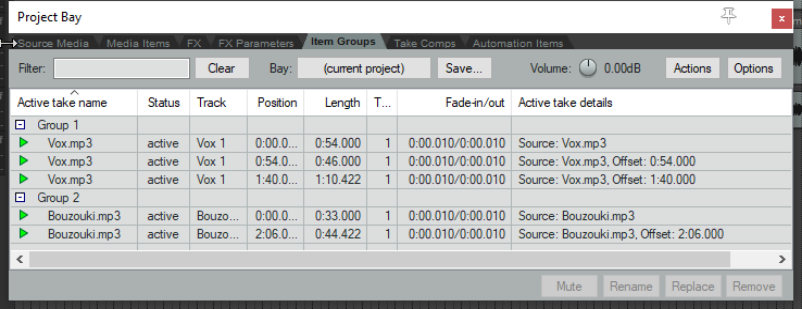
- Open the Project Bay and select the Item Groups tab.
- In arrange view, select the items for your first group then right click over one of them and choose Group then Group items from the menu. A group will automatically be created in the Project Bay. You can right click over the group name and choose Rename group to give it your own name.
- Repeat this step to create subsequent groups. The example here shows a project with two item groups.
To select all items in a group, you can now right click over its group name in the project bay and choose Select group from the menu. To remove a group, use the Delete group, keep items command on the same menu.
Tip: To adjust the volume of all items in a selected group, hold Ctrl and Alt while adjusting the item volume button or item volume handle of any one of the items in that group.