17.13 Surround Panning with ReaSurround and ReaSurroundPan
REAPER includes two plug-ins for surround mixing – ReaSurround and the more fully featured ReaSurroundPan.
Kind: concept (user-guide-section) Chapter: 17 More Routing Examples Source: REAPER User Guide v7.70
REAPER includes two plug-ins for surround mixing – ReaSurround and the more fully featured ReaSurroundPan. It’s advisable to read thru this entire section before deciding which is most suited to your own needs.
Surround sound production is a complex topic. It would be beyond the scope of this User Guide to attempt to cover the principles, theory and practical issues that it involves. Whole books have been written on the subject: you can also consult various web resources, such as “The Recording Academy's Producers and Engineers Wing Recommendations for Surround Sound Production” (available as free PDF download). This section is intended for those who are familiar with the principles of surround mixing and who need to know how to put these into practise within REAPER. REAPER's surround sound production capabilities can be found in three main areas:
- Producing music in multichannel format. For how to do this see Chapter 3. 2. REAPER's channel routing capabilities. Remember that you can use item channel mapping to assign the
output of different media items to different channels. 3. The ReaSurround and ReaSurroundPan are in many respects similar, the most
important difference being that ReaSurround is a spatial positioning plug-in, whereas ReaSurroundPan is a multi-channel panner. REAPER-specific issues that you need to be aware of for surround sound production are:
Configurations
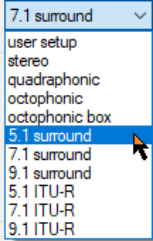
Both plug-ins support several surround sound configurations, such as 5.1, 7.1 and 9.1. Specify your number of input channels and select your required configuration from the drop down list (for ReaSurround, shown here). In addition, ReaSurroundPan also supports surround 7.1.2, 7.1.4 and 3D ITU and Auro options. You can also specify your own custom arrangements, by selecting User Setup (ReaSurround) or Custom Speakers (ReaSurroundPan) from the speakers dropdown.
Recording
Record each track using the settings most suitable for that track. For example, for a lead vocal you might use a two channel track with a single mono input (one mic). For a piano, you might record in stereo with two mics. For ambient sounds you might prefer a four channel track with four mic inputs.