8.10 Managing Comps with the Project Bay
To open and display the Project Bay, use the View, Project Media/FX Bay command.
Kind: concept (user-guide-section) Chapter: 8 Managing, Comping and Editing Takes Source: REAPER User Guide v7.70
To open and display the Project Bay, use the View, Project Media/FX Bay command. Click on the tab labeled Take Comps to display the takes and comps management section. Clicking on the Options button then displays a menu which includes the option to Mirror selection in bay and project. This lets you select any media item or segment by clicking on it either in the project itself or in the list shown in the project bay.
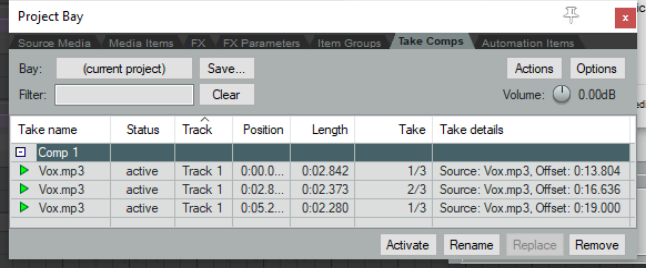
Within the project bay window right click over any listed comp for a context menu. Choices include Activate comp, Rename comp and Delete comp (keep takes). You can also create a new comp from your current take selection by clicking on the Actions button (top right) and choosing Create new comp from that menu.