15.4 The Actions List Context Menu
The Actions window right-click menu allows you to Add keyboard.
Kind: concept (user-guide-section) Chapter: 15 Customization: Actions, Mouse Modifiers, Menus and More Source: REAPER User Guide v7.70
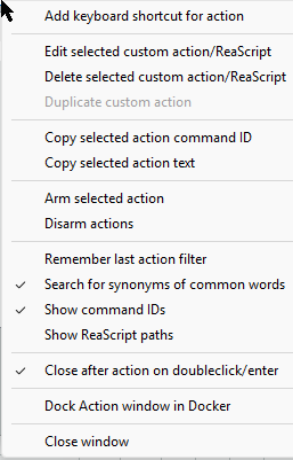
The Actions window right-click menu allows you to Add keyboard
shortcut for [currently selected] item.
This menu (shown here) also includes three options for managing custom actions/ReaScripts: Edit, Delete or Duplicate. There are two commands to Copy selected action command ID and Copy selected action text. There are options to Arm selected action and Disarm actions, Remember last action filter (when the list is closed and later reopened), Search for synonyms of common words and/or Close after action on double-click/enter. Search for synonyms of common words lets your search be more flexible. For example, a search for delete take would find actions whose description include delete take or remove take. The next two actions are mainly to assist script writers and developers. These are Show command IDs, Show ReaScript paths. Finally, there are the toggle actions to Close (window) after action on doubleclick/enter, Dock Action window in Docker and Close window. Above the actions list there is also an Options button which gives you direct access to five of the most commonly used of these commands: Remember last action filter, Search for synonyms of common words, Show command Ids, Show ReaScript paths and Close after action on doubleclick/enter.