18.26 Locking Envelopes
Envelopes can be locked in order to prevent any accidental changes or deletions from taking place.
Kind: concept (user-guide-section) Chapter: 18 Automation – Envelopes and More Source: REAPER User Guide v7.70
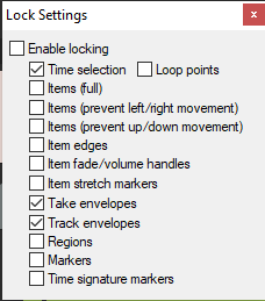
Envelopes can be locked in order to prevent any accidental changes or deletions from taking place. Pressing Shift L (or right-clicking on the Lock toolbar button) will cause the Lock Settings window to be displayed (see right). You should then select the Take envelopes and/or Track envelopes options, along with any other aspects that you also require to be locked. You can reverse these settings at any time. Note that even with your envelopes options selected, locking will only be applied if you also select the Enable locking option. The keyboard shortcut L can be used to toggle lock enabled status on and off.