12.11 Creating a Text Track
You can create a text track that can be used to display lyrics and/or any relevant song notes (see right).
Kind: concept (user-guide-section) Chapter: 12 Managing The Overall Project Source: REAPER User Guide v7.70
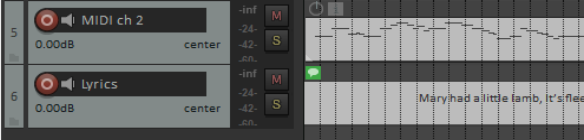
You can create a text track that can be used to display lyrics and/or any relevant song notes (see right). To do this, follow this sequence:
●Add a track and, with the track selected, make a time selection covering the length of the song. ●Choose the Insert, Empty item command. ●Double-click on the item to open it. Type your text, then click OK. Tip: You can choose any installed font and font size for your media item label and empty item notes – for example, to make them larger. Run the action Theme development: Show theme tweak/configuration window and select a font of your choice.