5.5 Searching the Preferences Settings
You have already come across a number of REAPER’s preferences settings.
Kind: concept (user-guide-section) Chapter: 5 Project Arrangement Basics Source: REAPER User Guide v7.70
You have already come across a number of REAPER’s preferences settings. For example, we have looked at some of the preferences settings for Audio Devices, MIDI Devices, Recording and Projects. The more you work with REAPER, the more you will realise how
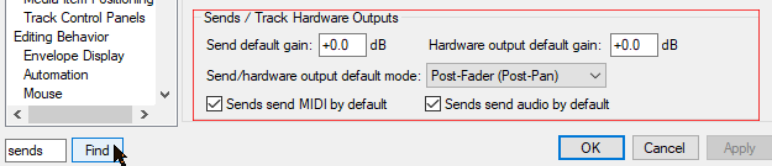
very many preferences settings there are, so many that it can sometimes be difficult to remember where to go for a particular setting. To help you there is a text box and a Find button near the bottom of the Preferences window. You can enter any word or phrase in the box, click on Find and the first occurrence of that word or phrase will be shown. Each time you click the Find button the next occurrence of that word or phrase will be shown. The item will be displayed with a colored highlight. In the example shown here, a search for sends has turned up some information about various options for setting the default parameters for track sends when they are created.